Stacking
Il passaggio finale da fare con Siril è lo stacking delle immagini. Vai nel tab "Stacking", indica se vuoi effettuare lo stacking di tutte le immagini, delle sole selezionate o delle immagini migliori secondo il valore FWHM[1] precedentemente calcolato. Siril propone diversi algoritmi per l'esecuzione dello stacking.
Nota
Siril utilizza internamente un'immagine a 32-bit per elaborare lo stacking. Questa viene poi salvata in un'immagine a 16-bit.
SuggerimentoStacking di immagini planetarie⚓
Siril fornisce un'opzione per allineare automaticamente i canali RGB alla fine dello stacking.
SchermataStacking⚓
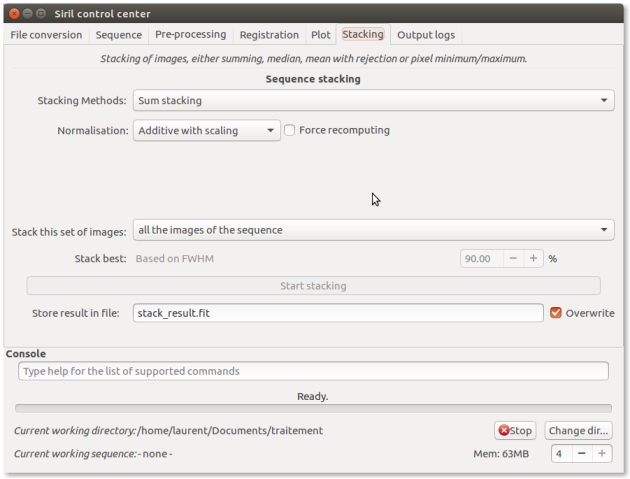
- 1 Stacking Methods

Sum stacking
Average stacking with rejection
Median stacking
Pixel maximum stacking
Pixel minimum stacking
- 2 Normalization

No normalization
Additive
Multiplicative
Additive with scaling
Multiplicative with scaling
- 3 Force recomputing

By default, Siril takes the normalization coefficients from seq file if already computed. However you can force Siril to recompute it before stacking.
- 4 Stack this set of images

all the images of the sequence
images previously manually selected from the sequence
best images, automatically selected from the registration data (PSF)
best images, automatically selected from the registration data (Planetary)
- 5 Start stacking

Start stacking the current sequence of images, using the method and other information provided above.
- 6 Store result in file:

Choose a file name
- 7 Overwrite

Overwrite file without notice if it already exists.






